How to Connect Your Bank Account to Bexio (2025 Guide)

Manual invoice reconciliation wastes 3-4 hours every month. Learn how to connect your Swiss bank account to Bexio and eliminate tedious payment matching forever.

Swiss business professional working with banking software

Why Bank Connection Matters

Connecting your Swiss bank account to Bexio eliminates tedious reconciliation tasks. Incoming payments automatically match with open invoices. Outgoing payments sync without manual entry.

Save 3-4 Hours MonthlyNo more manual payment matching
🔄
Automatic SyncTransactions appear overnight
Error-Free ReconciliationInvoices mark as paid automatically
Bank-Specific Instructions

Setup Guides for Major Swiss Banks

Each bank has unique requirements. Follow the specific instructions for your institution.

UBS

UBS Connection (Streamlined)

UBS clients benefit from a streamlined setup with bonus discounts.

  • Select UBS from Bexio's bank list
  • Authenticate once through UBS e-banking
  • Confirm the connection in your UBS mobile app
  • Bonus: 30% off Bexio for the first year
UBS Bank Connection Security
PostFinance

PostFinance Connection (Extra Steps Required)

PostFinance requires an extra phone call that catches many users off guard.

  • FIRST: Call PostFinance customer service
  • Request: Camt.053 version 8 with detailed notification, without images
  • Wait up to 5 working days for activation
  • Then complete connection in Bexio
PostFinance Setup Documentation
Raiffeisen

Raiffeisen Connection (Straightforward)

Raiffeisen setup follows the standard process with quick results.

  • Select Raiffeisen in Bexio
  • Enter your e-banking credentials
  • Confirm via mobile app or card reader
  • Transactions typically appear within 24 hours
Small business owner using Raiffeisen

Method 2: Manual CAMT.053 Import

When direct connection fails—or if you prefer not sharing credentials—manual import works reliably. CAMT.053 is the Swiss standard format for bank statements, supported by all Swiss financial institutions.

🇨🇭 ISO 20022 Standard
🏦 All Swiss Banks
🔐 Privacy-First
📊 Full Transaction Data
📄
What is CAMT.053?

Swiss standard XML format for statements

🔒
No Credential Sharing

Your login stays completely private

Always Works

Independent of bank connectivity

📅
Flexible Frequency

Import weekly or monthly as needed

How to Download CAMT.053 Files

From UBS

  1. Log into UBS e-banking
  2. Go to Documents → Account statements
  3. Select CAMT.053 format
  4. Choose your date range
  5. Download the XML file

From PostFinance

  1. Access PostFinance e-banking
  2. Navigate to Account → Statements
  3. Select "Electronic statement (camt.053)"
  4. Download for your desired period

From Raiffeisen

  1. Log into Raiffeisen e-banking
  2. Go to Mailbox or Documents
  3. Find electronic statements
  4. Download in CAMT.053 format

Importing into Bexio

  1. In Bexio, go to Banking
  2. Click Import bank statements
  3. Select your CAMT.053 file
  4. Review the preview
  5. Confirm the import

Import frequency: Most users import weekly or monthly, depending on transaction volume.

Comparison

Direct Connection vs. Manual Import

Choose the method that fits your security preferences and workflow needs.

FactorDirect ConnectionManual Import
Setup Time5-10 minutes2-3 min per import
Ongoing Effort NoneWeekly/monthly downloads
Data FreshnessDaily (overnight sync)As frequent as you import
Credential SecurityShared with Bexio No sharing
ReliabilityDepends on bank Always works
Best ForHigh transaction volumeSecurity-conscious users
Simpler Alternative

A Simpler Alternative for Freelancers

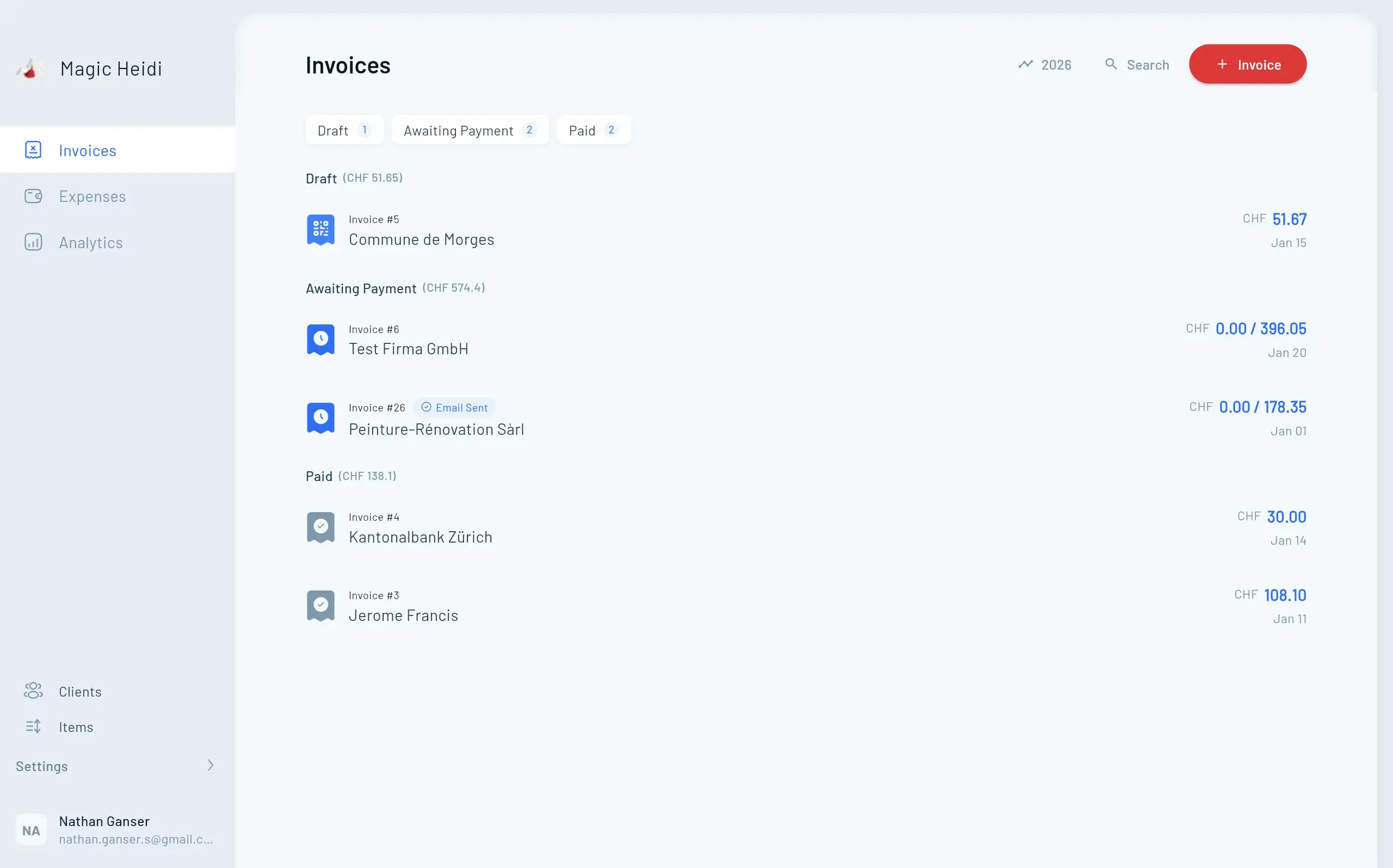
If Bexio's setup feels overwhelming, Magic Heidi offers a streamlined approach for Swiss freelancers. Drag-and-drop Excel import, no credential sharing required, and automatic invoice matching—all built specifically for Swiss requirements.

Magic Heidi Invoice List Dashboard

Why Freelancers Choose Magic Heidi

For freelancers who need invoicing and payment tracking without full accounting complexity, this streamlined approach saves significant setup time.

📂
Drag-and-Drop ImportNo CAMT.053 hassle—just drop your Excel export
🔒
No Credential SharingYour banking login stays completely private
🇨🇭
Built for Swiss FreelancersSwiss VAT, QR invoices, and local formats
FAQ

Frequently Asked Questions

Is it safe to connect my bank to Bexio?

Bexio uses encrypted connections meeting Swiss banking standards. Your data stays in Switzerland. However, you are sharing credentials with a third-party system—some users prefer manual import for this reason.

Which Swiss banks work with Bexio?

Over 20 banks including UBS, PostFinance, Raiffeisen, Credit Suisse, and most cantonal banks. Check Bexio's banking page for the current list.

How long until transactions sync?

Direct connections sync overnight, typically within 24 hours. New connections may take 48 hours for initial sync.

Can I connect multiple bank accounts?

Yes, Bexio supports multiple bank connections. Add each account separately through the Banking module.

What if my bank isn't supported?

Use manual CAMT.053 import. All Swiss banks provide this file format through e-banking.

Why does PostFinance require a phone call?

PostFinance requires customers to explicitly order the ISO 20022 file format. This can only be done via phone, and takes up to 5 working days to activate.

How much does Bexio banking cost?

Banking features are included in all Bexio plans starting at CHF 45/month. No additional fees for bank connections.

Next Steps

  1. Check your bank on Bexio's supported list
  2. Gather credentials for your e-banking
  3. For PostFinance: Call to order CAMT.053 format first
  4. Connect or import using the method that fits your security preferences
  5. Test with a few transactions before relying on automatic matching

Automated bank reconciliation saves Bexio users up to 12 hours monthly on administrative tasks. Whether you choose direct connection or manual import, eliminating manual invoice matching frees time for actual work.

Need a Simpler Solution?

Try Magic Heidi free — drag-and-drop bank imports, no credential sharing, built for Swiss freelancers.